 MariaDB: Getting started
How to get started with MariaDB
👋 Welcome to the Stackhero documentation!
Stackhero offers a ready-to-use MariaDB cloud solution that provides a host of benefits, including:
- Unlimited connections and transfers.
- phpMyAdmin web UI included.
- Effortless updates with just a click.
- Optimal performance and robust security powered by a private and dedicated VM.
Save time and simplify your life: it only takes 5 minutes to try Stackhero's MariaDB cloud hosting solution!
MariaDB URLs
The easiest way to connect to your MariaDB service is to use the MySQL URL format, as long as your driver supports it:
mysql://root:<ROOT_PASSWORD>@<XXXXXX>.stackhero-network.com:<PORT>/root?useSSL=true&requireSSL=true
If you are using Ruby, the MySQL URL is slightly different:
mysql2://root:<ROOT_PASSWORD>@<XXXXXX>.stackhero-network.com:<PORT>/root?reconnect=true&useSSL=true&requireSSL=true
Using MariaDB with PHP
Here are a few examples that show how you can connect to MariaDB from PHP using different extensions. While these examples use the "root" database, it is best to create a dedicated database and user for your application, especially for production environments.
Using MariaDB with PHP and MySQLi (object-oriented style)
<?php

$hostname = '<XXXXXX>.stackhero-network.com';
$port     = '<PORT>';
$user     = 'root';
$password = '<ROOT_PASSWORD>';
$database = 'root'; // For demonstration only. For best practice, create your own database and user in phpMyAdmin and use those credentials.

$mysqli = mysqli_init();
$mysqliConnected = $mysqli->real_connect($hostname, $user, $password, $database, $port, NULL, MYSQLI_CLIENT_SSL);
if (!$mysqliConnected) {
  die('Connection Error: ' . $mysqli->connect_error);
}

echo 'Connection successful... ' . $mysqli->host_info . "\n";

$mysqli->close();

?>
Using MariaDB with PHP and MySQLi (procedural style)
<?php

$hostname = '<XXXXXX>.stackhero-network.com';
$port     = '<PORT>';
$user     = 'root';
$password = '<ROOT_PASSWORD>';
$database = 'root'; // For demonstration only. For best practice, create your own database and user in phpMyAdmin and use those credentials.

$mysqli = mysqli_init();
$mysqliConnected = mysqli_real_connect($mysqli, $hostname, $user, $password, $database, $port, NULL, MYSQLI_CLIENT_SSL);
if (!$mysqliConnected) {
  die('Connection error: ' . mysqli_connect_error($mysqli));
}

echo 'Success: ' . mysqli_get_host_info($mysqli) . "\n";

mysqli_close($mysqli);

?>
Using MariaDB with PHP and PDO
<?php

$hostname = '<XXXXXX>.stackhero-network.com';
$port     = '<PORT>';
$user     = 'root';
$password = '<ROOT_PASSWORD>';
$database = 'root'; // For demonstration only. For best practice, create your own database and user in phpMyAdmin and use those credentials.

$dsn = "mysql:host=$hostname;port=$port;dbname=$database";

$options = array(
  // If you get an error like "Uncaught PDOException: PDO::__construct(): SSL operation failed with code 1. OpenSSL Error messages: error:0A000086:SSL routines::certificate verify failed", make sure your /etc/ssl/certs/ directory contains CA certificates.
  PDO::MYSQL_ATTR_SSL_CAPATH => '/etc/ssl/certs/',
  // PDO::MYSQL_ATTR_SSL_CA => 'isrgrootx1.pem',
  PDO::MYSQL_ATTR_SSL_VERIFY_SERVER_CERT => true,
);

$pdo = new PDO($dsn, $user, $password, $options);

$stm = $pdo->query('SELECT VERSION()');
$version = $stm->fetch();

echo 'You are connected to a database running version ' . $version[0] . "\n";

?>
How to resolve the "SSL operation failed with code 1" error
If you see this error:
Uncaught PDOException: PDO::__construct(): SSL operation failed with code 1. OpenSSL Error messages: error:0A000086:SSL routines::certificate verify failed
it is likely because the /etc/ssl/certs/ directory is missing the necessary CA certificates. If you have system access, here are some suggestions for installing them:
-
On Ubuntu, you might run:
apt-get install ca-certificates -
On Alpine Linux, try:
apk add ca-certificates
If you do not have system-level access, you can add the certificate manually:
- Download the certificate: https://letsencrypt.org/certs/isrgrootx1.pem
- Place the
isrgrootx1.pemfile into your PHP project. - Comment out the line with
PDO::MYSQL_ATTR_SSL_CAPATH => '/etc/ssl/certs/' - Uncomment the line with
PDO::MYSQL_ATTR_SSL_CA => 'isrgrootx1.pem'
How to resolve "Fatal error: Uncaught Error: Undefined constant PDO::MYSQL_ATTR_SSL_CAPATH"
If you see an error like this:
Fatal error: Uncaught Error: Undefined constant PDO::MYSQL_ATTR_SSL_CAPATH
or a similar message referencing an undefined constant for PDO MySQL attributes, your PDO installation probably does not include MySQL support.
On Ubuntu/Debian
You can install the required PHP MySQL extension with:
sudo apt-get install php-mysql
If you are using Docker
To make sure MySQL support is available, you can add the following to your Dockerfile:
RUN docker-php-ext-install pdo pdo_mysql
Using MariaDB with Symfony and Doctrine
To get started, edit your .env file and set the DATABASE_URL variable like this:
DATABASE_URL="mysql://<USER>:<PASSWORD>@<XXXXXX>.stackhero-network.com:<PORT>/<DATABASE>"
Next, update your config/packages/doctrine.yaml file to set the driver and options:
doctrine:
    dbal:
        url: '%env(resolve:DATABASE_URL)%'
        driver: 'pdo_mysql'
        options:
            # PDO::MYSQL_ATTR_SSL_CAPATH
            1010: '/etc/ssl/certs'
            # PDO::MYSQL_ATTR_SSL_VERIFY_SERVER_CERT
            1014: true
How to fix the "SSL operation failed with code 1" error
If you run into this error:
Uncaught PDOException: PDO::__construct(): SSL operation failed with code 1. OpenSSL Error messages: error:0A000086:SSL routines::certificate verify failed
it is probably because your system does not have the CA certificates installed. Here are a couple of ways you can install them:
-
On Ubuntu/Debian, you can run:
sudo apt-get install ca-certificates -
On Alpine Linux, try:
apk add ca-certificates
If you cannot install CA certificates system-wide, you can add them manually:
-
Download the certificate: https://letsencrypt.org/certs/isrgrootx1.pem
-
Place the
isrgrootx1.pemfile in your Symfony project. -
Update your
config/packages/doctrine.yamlfile:doctrine: dbal: url: '%env(resolve:DATABASE_URL)%' driver: 'pdo_mysql' options: # PDO::MYSQL_ATTR_SSL_CA 1009: 'isrgrootx1.pem' # PDO::MYSQL_ATTR_SSL_VERIFY_SERVER_CERT 1014: true
Using MariaDB with Laravel
To configure MariaDB with Laravel, open config/database.php and update the mysql configuration like this:
'mysql' => [
  'driver'   => 'mysql',
  'host'     => env('STACKHERO_MARIADB_HOST'),
  'port'     => env('STACKHERO_MARIADB_PORT'),
  'username' => env('STACKHERO_MARIADB_USER'),
  'password' => env('STACKHERO_MARIADB_PASSWORD'),
  'database' => env('STACKHERO_MARIADB_USER'),
  'charset'  => 'utf8mb4',
  'collation'=> 'utf8mb4_unicode_ci',
  'prefix'   => '',
  'prefix_indexes' => true,
  'strict'   => true,
  'engine'   => null,
  'sslmode'  => 'require',
  'options'  => extension_loaded('pdo_mysql')
    ? array_filter([
      // If you run into SSL errors like "Uncaught PDOException: PDO::__construct(): SSL operation failed with code 1. OpenSSL Error messages: error:0A000086:SSL routines::certificate verify failed", see the troubleshooting steps above.
      PDO::MYSQL_ATTR_SSL_CAPATH => '/etc/ssl/certs/',
      // PDO::MYSQL_ATTR_SSL_CA => 'isrgrootx1.pem',
      PDO::MYSQL_ATTR_SSL_VERIFY_SERVER_CERT => true,
    ])
    : [],
],
Using MariaDB with PHP CodeIgniter
Inside your database.php file, you can set up the following configuration:
$db['default'] = array(
  'hostname' => getenv('STACKHERO_MARIADB_HOST'),
  'port'     => getenv('STACKHERO_MARIADB_PORT'),
  'username' => getenv('STACKHERO_MARIADB_USER'),
  'password' => getenv('STACKHERO_MARIADB_PASSWORD'),
  'database' => getenv('STACKHERO_MARIADB_USER'), // By convention, the database name matches the username.
  'dbdriver' => 'mysqli',
  'dbprefix' => '',
  'pconnect' => TRUE,
  'char_set' => 'utf8',
  'dbcollat' => 'utf8_general_ci',
  'encrypt'  => array() // Important: activate TLS encryption
);
Connecting MariaDB with PHP using environment variables
A good practice is to keep your credentials out of your code by using environment variables. You can retrieve them like this:
$hostname = getenv('STACKHERO_MARIADB_HOST');
$port     = getenv('STACKHERO_MARIADB_PORT');
$user     = getenv('STACKHERO_MARIADB_USER');
$password = getenv('STACKHERO_MARIADB_PASSWORD');
$database = getenv('STACKHERO_MARIADB_USER'); // By convention, the database name matches the username.
Using MariaDB with WordPress
Connecting WordPress to Stackhero for MariaDB is simple. In your wp-config.php file, set the following database parameters:
define('DB_HOST', '<XXXXXX>.stackhero-network.com');
define('DB_PORT', '<PORT>');
define('DB_NAME', 'root');
define('DB_USER', 'root');
define('DB_PASSWORD', '<yourPassword>');

// Enable TLS encryption (also called SSL)
define('MYSQL_CLIENT_FLAGS', MYSQLI_CLIENT_SSL);
The crucial step here is enabling TLS encryption (sometimes called SSL). The connection will not work without it.
Using MariaDB with Node.js
If you are using Node.js, you can try the mysql2 package, which has promise support. To install it:
npm install mysql2
Here is an example you can adapt:
const mysql = require('mysql2/promise');

(async () => {
  const db = await mysql.createConnection({
    host: '<XXXXXX>.stackhero-network.com',
    port: '<PORT>',
    user: 'root',
    password: '<ROOT_PASSWORD>'
  });

  // Create a database if it does not already exist
  await db.query('CREATE DATABASE IF NOT EXISTS stackherotest');

  // Create the users table if it does not exist
  await db.query(
    'CREATE TABLE IF NOT EXISTS `stackherotest`.`users` (' +
      '`userId` INT UNSIGNED NOT NULL,' +
      '`name` VARCHAR(128) NOT NULL,' +
      '`address` TEXT NOT NULL,' +
      '`email` VARCHAR(265) NOT NULL' +
    ') ENGINE = InnoDB;'
  );

  // Insert a sample user
  await db.query(
    'INSERT INTO `stackherotest`.`users` (`userId`, `name`, `address`, `email`) VALUES ?',
    [
      [
        Math.round(Math.random() * 100000), // Generate a userId
        'User name',                         // name
        'User address',                      // address
        '[email protected]'                     // email
      ]
    ]
  );

  // Count users in the table
  const [usersCount] = await db.query('SELECT COUNT(*) AS `cpt` FROM `stackherotest`.`users`');
  console.log(`There are now ${usersCount[0].cpt} entries in the table "users"`);

  // Close the connection
  await db.end();

})().catch(error => {
  console.error('');
  console.error('An error occurred!');
  console.error(error);
  process.exit(1);
});
Using MariaDB with Node.js/NestJS/TypeORM
For Node.js, NestJS, or TypeORM, you can enable SSL by including the ssl option:
TypeOrmModule.forRoot({
  type: 'mysql',
  host: '<XXXXXX>.stackhero-network.com',
  port: '<PORT>',
  username: 'root',
  password: '<ROOT_PASSWORD>',
  database: 'root',
  entities: [],
  synchronize: true,
  ssl: {}
});
Using MariaDB with Prisma
To connect to MariaDB with Prisma, simply add sslaccept=strict to your connection URL. For example, if you are connecting as user "root" to the database "root":
datasource db {
  provider = "mysql"
  url = "mysql://root:<ROOT_PASSWORD>@<XXXXXX>.stackhero-network.com:<PORT>/root?sslaccept=strict"
}
Using MariaDB with Django
If you have not already, you can install the mysqlclient module to connect Django to MariaDB:
pip install mysqlclient
If you get the error
Exception: Can not find valid pkg-config namewhile installing, you may need to install thelibmysqlclientpackage first. For Ubuntu/Debian:apt-get update && apt-get install --no-install-recommends -y libmysqlclient-dev
To test your connection, you might start by putting your credentials directly into settings.py. This is fine for testing, but it is not secure for a production environment.
DATABASES = {
  'default': {
    'ENGINE': 'django.db.backends.mysql',
    'HOST': '<XXXXXX>.stackhero-network.com',
    'PORT': '<PORT>',
    'OPTIONS': {
      'ssl_mode': 'REQUIRED',
    },
    'NAME': 'root',
    'USER': 'root',
    'PASSWORD': '<ROOT_PASSWORD>'
  }
}
Please note: This example is only for testing. You should not use hardcoded credentials in production.
Once you confirm the connection works, it is safer to store credentials in environment variables. If you use django-environ, you can install it like this:
pip install django-environ
Then update settings.py:
import environ
env = environ.Env()
environ.Env.read_env()

DATABASES = {
  'default': {
    'ENGINE': 'django.db.backends.mysql',
    'HOST': env('STACKHERO_MARIADB_HOST'),
    'PORT': env('STACKHERO_MARIADB_PORT'),
    'OPTIONS': {
      'ssl_mode': 'REQUIRED',
    },
    'NAME': 'root',
    'USER': 'root',
    'PASSWORD': env('STACKHERO_MARIADB_ROOT_PASSWORD')
  }
}
Then, create or update the .env file (in the same directory as settings.py) with:
STACKHERO_MARIADB_HOST=<XXXXXX>.stackhero-network.com
STACKHERO_MARIADB_PORT=<PORT>
STACKHERO_MARIADB_ROOT_PASSWORD=<ROOT_PASSWORD>
Finally, to keep your credentials safe, add .env to your .gitignore:
echo ".env" >> .gitignore
Connecting MariaDB with Java/Spring
To connect a Spring application to MariaDB, you can set the SPRING_DATASOURCE_URL environment variable with your database URL, using the jdbc: prefix. For example:
SPRING_DATASOURCE_URL=jdbc:mysql://root:<ROOT_PASSWORD>@<XXXXXX>.stackhero-network.com:<PORT>/root?useSSL=true&requireSSL=true
Connecting MariaDB with Groovy/Grails
Here is an example of how you can configure your Grails application to connect to MariaDB:
dataSource {
  pooled = true
  driverClassName = "com.mysql.cj.jdbc.Driver"
  dialect = org.hibernate.dialect.MySQL8Dialect
  // SSL-specific properties
  properties {
    useSSL = true
    requireSSL = true
    verifyServerCertificate = true
    sslMode = "REQUIRED"
  }
}

environments {
  production {
    dataSource {
      dbCreate = "none"
      url = "jdbc:mysql://" + System.env.STACKHERO_MYSQL_HOST + ":" + System.env.STACKHERO_MYSQL_PORT + "/root?useSSL=true&requireSSL=true&verifyServerCertificate=true&sslMode=required" // Replace '/root' with your actual database name.
      username = "root" // It is a good idea to create a dedicated user for your app.
      password = System.env.STACKHERO_MYSQL_ROOT_PASSWORD // Consider creating a dedicated user.
      properties {
        maxActive = 50
        minEvictableIdleTimeMillis = 1800000
        timeBetweenEvictionRunsMillis = 1800000
        numTestsPerEvictionRun = 3
        testOnBorrow = true
        testWhileIdle = true
        testOnReturn = false
        validationQuery = "SELECT 1"
      }
    }
  }
}
Creating a user on MariaDB using phpMyAdmin
For better security, it is best to create a dedicated user for your application instead of using the "root" user. You can easily do this in phpMyAdmin:
- In phpMyAdmin, click on
User accountsat the top.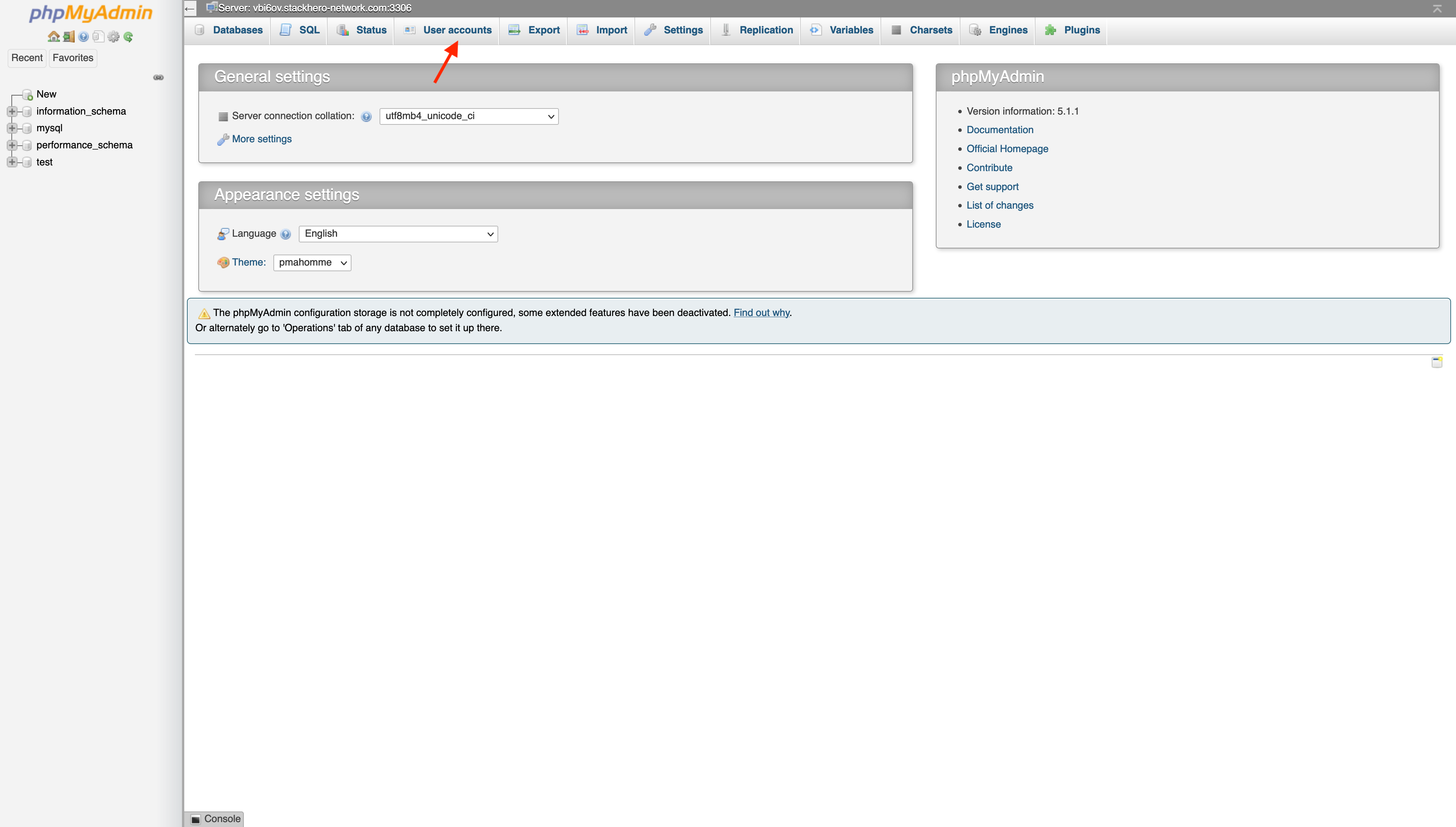
- Click on
Add user account.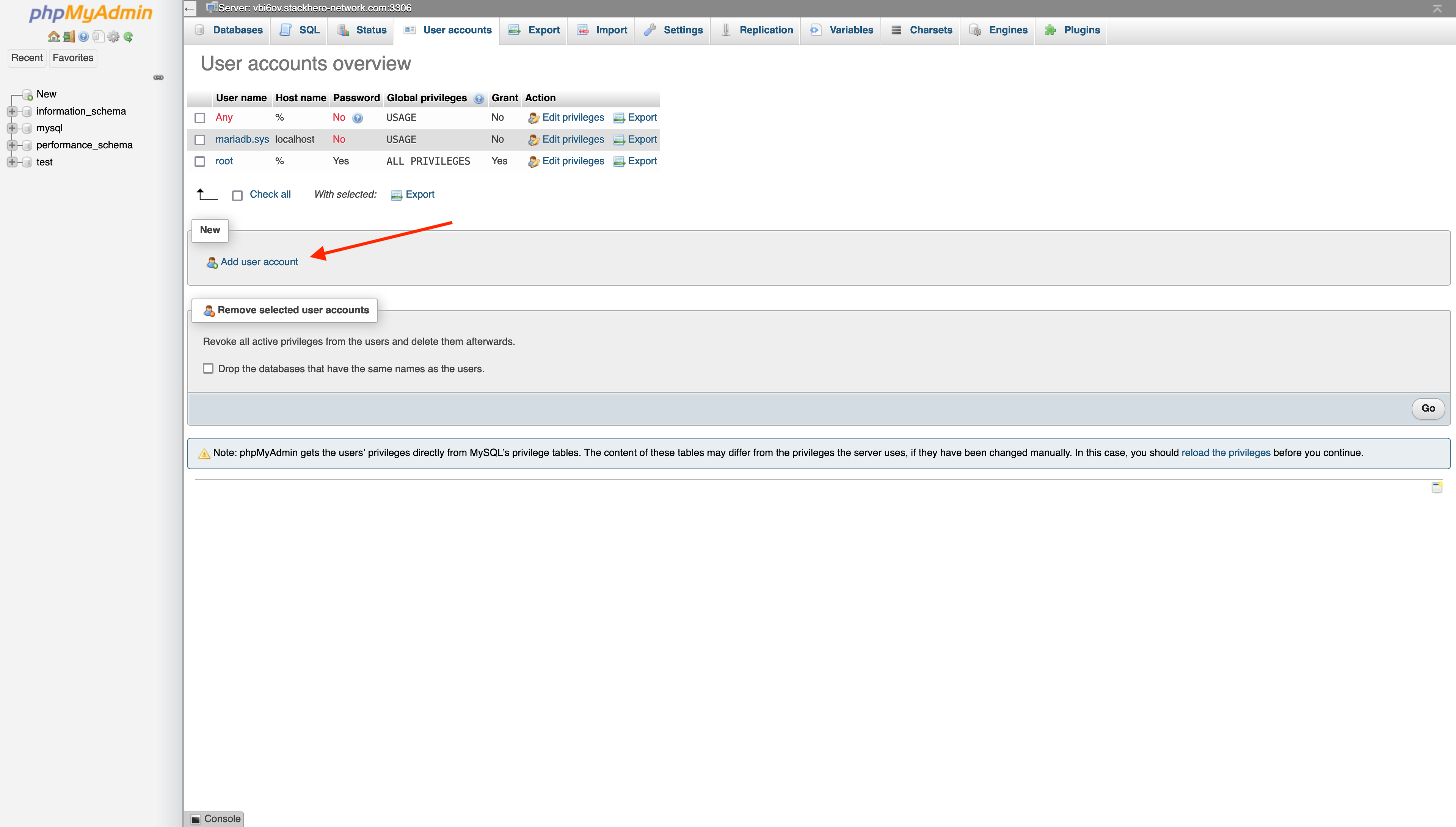
- Fill out the form:
- Choose a username (often your application name).
- Click
Generate passwordfor a strong password, and copy it. - Check
Create database with same name and grant all privileges.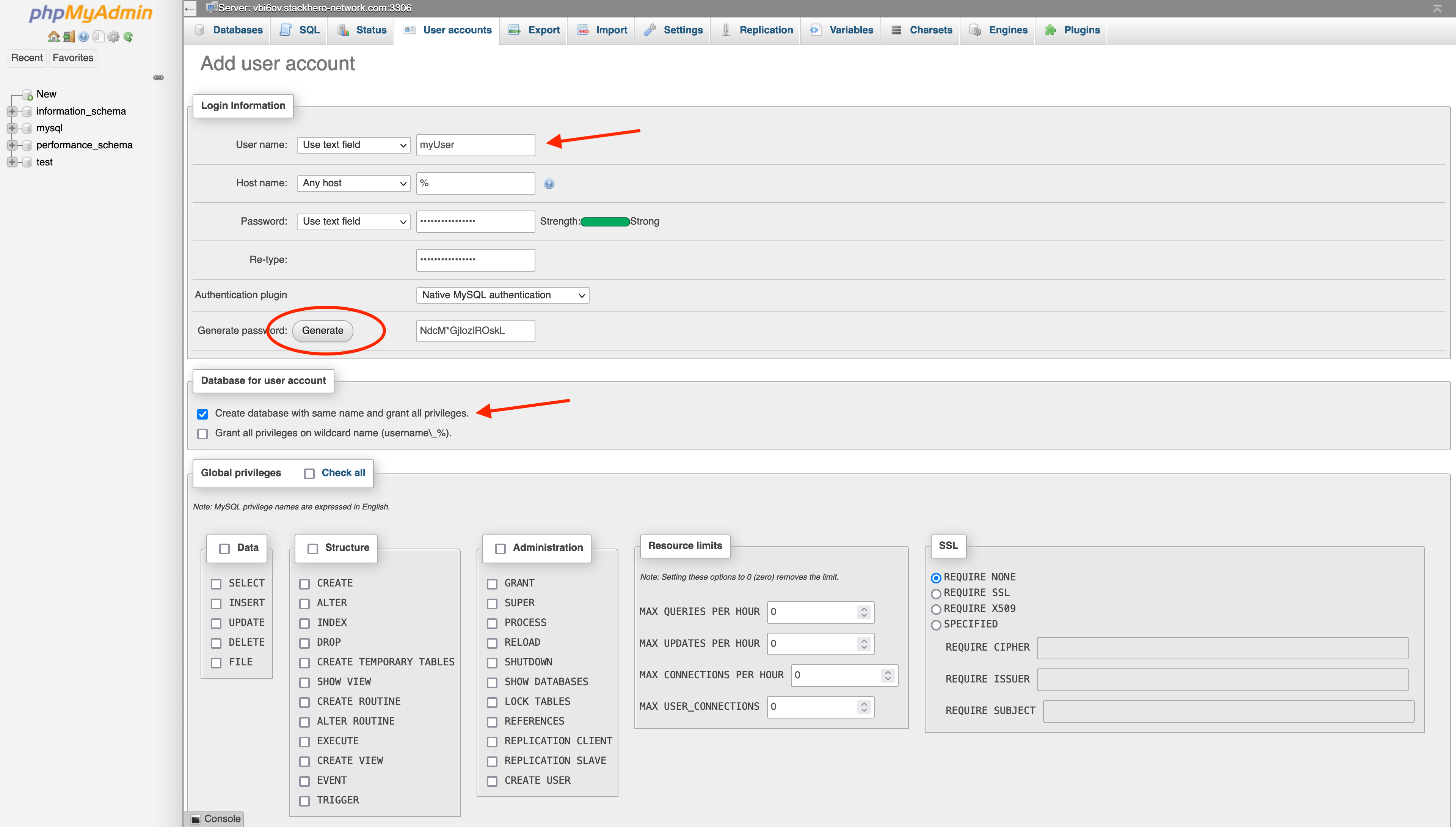
Once submitted, your new user and a matching database will be created.
Differences between MariaDB and MySQL
MariaDB is an independent fork of MySQL, created by the open source community after Oracle acquired MySQL in 2010. For most use cases, MariaDB and MySQL offer very similar features and compatibility.